Know where the field team is, while they are at work.
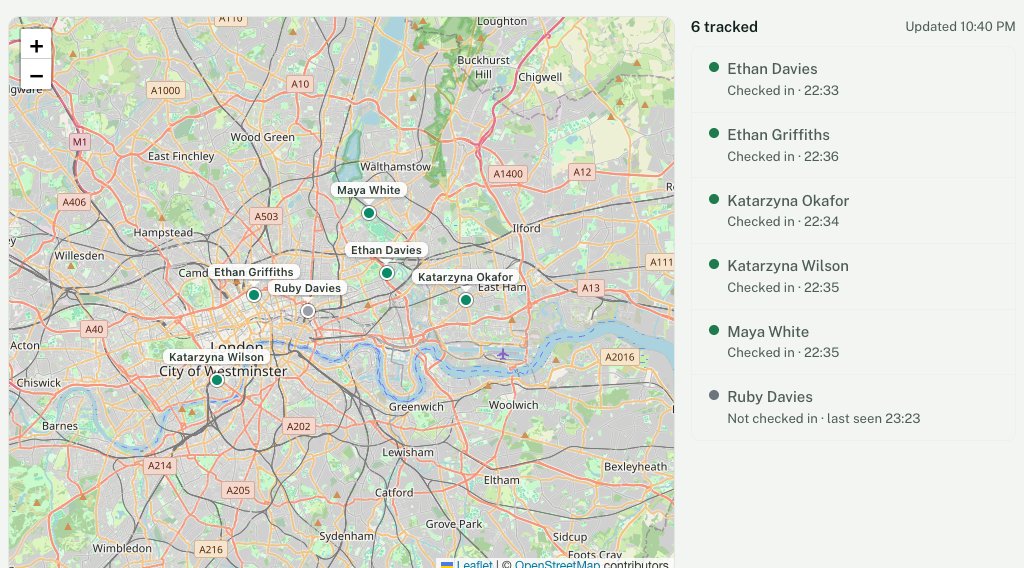
HRPay live tracking shows where your sales, service and delivery staff are while they are checked in, and the route, distance and stops of each of their days, from the HRPay Android app they already use for attendance.
Why companies track field staff
When people work away from the office, at clients, on sites or on delivery routes, the day is hard to see from the office. Did the visits happen, how far did they travel, who is nearest to the customer who just called? Most companies piece this together from phone calls and WhatsApp locations.
Live tracking answers these questions from the attendance app: only for the people you choose, and only while they are checked in.
What you see
- A live map of everyone you track, refreshed every 30 seconds, with when each person was last seen
- Each person’s day: the route on the map, the distance travelled, check-in and check-out, and every stop of five minutes or more with its times
- Any day in the last 90 days for routes; distance and stops are kept after that
- Tracking tied to attendance: positions are shared only between check-in and check-out

Fair to employees
Tracking someone is a decision about their privacy, so HRPay makes it open. The employee is told when you turn it on. Nothing is shared until they agree in the app, and their agreement is recorded. While their location is shared, Android shows a notification saying so, and it stops when they check out. Each tracked employee sees their own route for every day under My movement. Besides them, only the Owner, HR and their own manager can see where they are.
| Person | What they see |
|---|---|
| Owner and HR | Who is tracked, the live map, and every tracked person’s days |
| Manager | The live map and the days of the tracked people who report to them; they do not choose who is tracked |
| Tracked employee | Their own route for each day, and the notification while their location is shared |
| Everyone else | Nothing about anyone’s location |
How it works
- HR chooses the people to track in HRPay; each is told by e-mail and in the app
- The employee installs the HRPay Android app, agrees, and allows location and notifications
- At check-in the phone starts sharing its position about once a minute, even when the app is closed; positions taken without signal are sent later
- At check-out, or when HR stops tracking them, sharing stops
Positions come only from the Android app. The web and desktop apps show the maps but never share a location.
Price
Live tracking is an add-on to the HRPay Enterprise plan, at AED 10 per tracked employee a month plus VAT at 5%. You pay for a number of places and track up to that many people at a time; stopping someone frees their place. It is not part of the free trial. Online payment is not available yet: ask for places in HRPay or talk to us , and tracking can start once they are paid. See the pricing page .
Questions people ask
Keep reading
Run your next payroll on HRPay
Start the free trial, or see it with your own salary structures in a 30-minute demo.